AI hairstyle try-on for men
Find the haircut your face was made for.
Cutmaxx reads your face shape from one selfie and shows the haircuts, beards and colours that suit it, on your own photo, before you sit in the barber's chair.
What's my face shape? Read the guide- 36 haircuts
- 15 beards
- 12 hair colours
- 7 face shapes
The catalog
Every cut your barber knows, for every hair type.
Fades, crops, quiffs, mullets, afros, twists and locs, for straight, wavy, curly and coily hair.

Low taper fade
Clean sides with length on top: sharpens a soft face without looking severe.

Curly top fade
Keeps your curls, adds height and a clean outline.
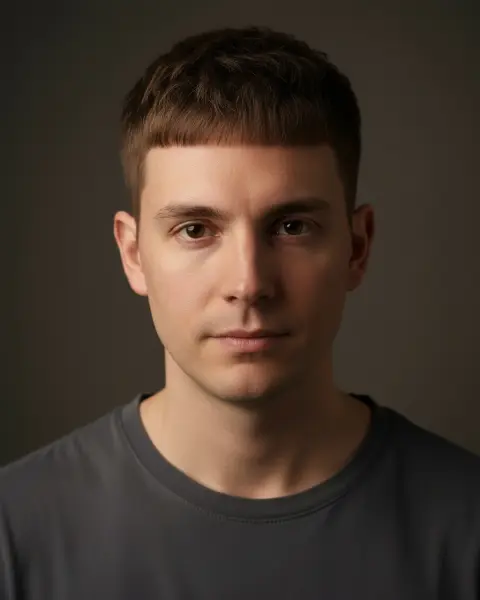
Textured French crop
A short fringe shortens a long face and hides a high forehead.
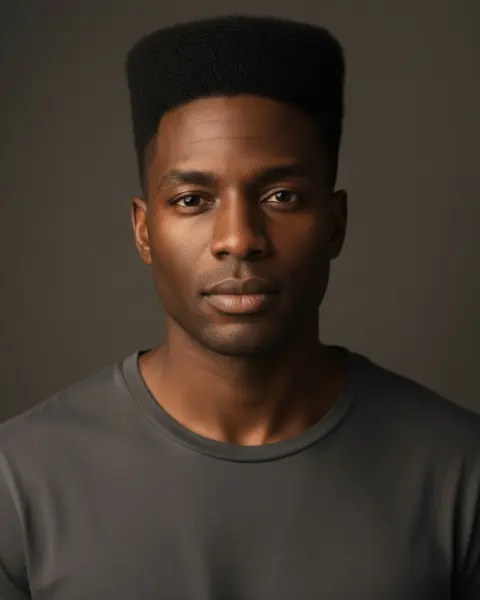
High-top fade
Tall, geometric height that lengthens a round or square face.

Classic quiff
Height at the front lengthens a round face and adds presence.
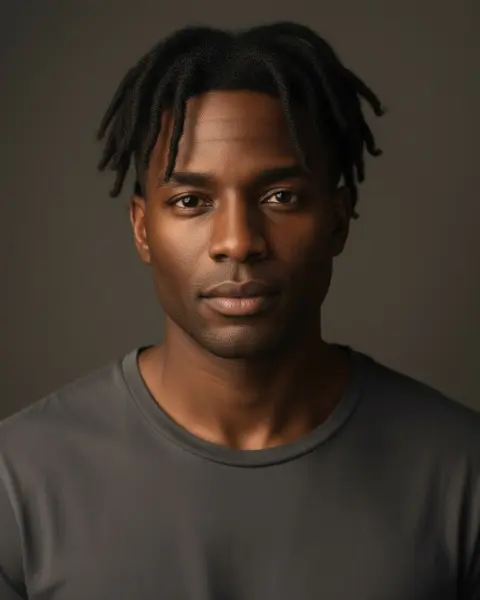
Two-strand twists
Texture and length on top that add width to a narrow face.
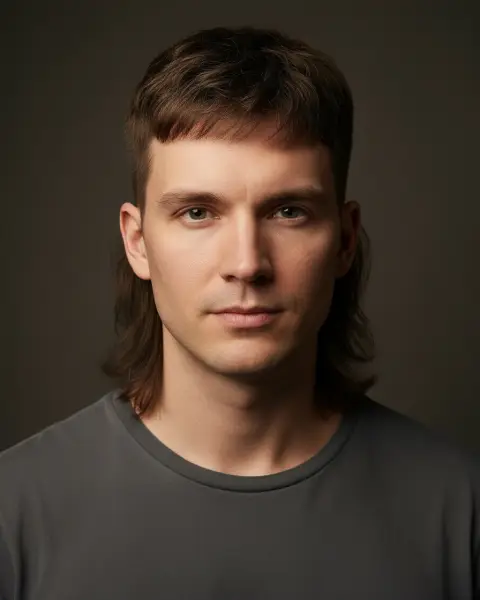
Modern mullet
Short at the sides, long at the back: the trend cut of 2026.
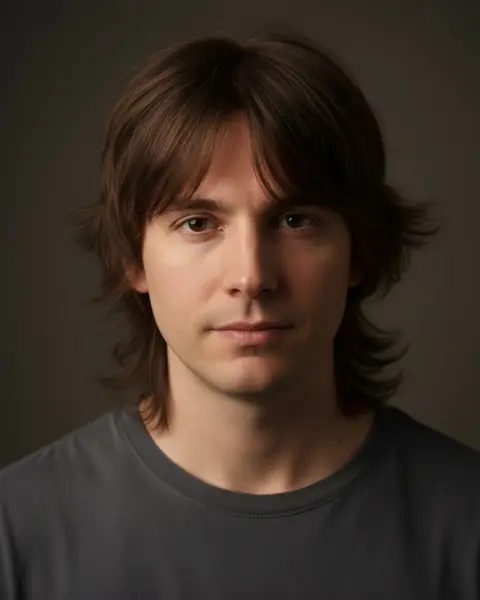
Wolf cut
Shaggy layers and a messy fringe: soft, wild and easy to wear.
How it works
From selfie to barber chair in four steps.
Step 1
Scan your face
One selfie. Your face shape is measured on your phone: oval, round, square, oblong, heart, diamond or triangle.
Step 2
Get your cuts
The haircuts and beards that suit your face shape and hair texture, the ones to avoid, and why.
Step 3
See it on you
Try any cut on your own photo, add a beard or a new colour, and compare before and after.
Step 4
Show your barber
Every look comes with a barber card: what to ask for on top, sides and back, and how to style it.
Face shape guide
The best haircuts for your face shape.
Each shape has a simple rule. Here it is, with the cuts that follow it.
Oval face
The most balanced shape: almost every cut works. Pick by style, not by fixing anything.
Best cut: Low taper fadeRound face
Add height on top and keep the sides short to lengthen the face and add angles.
Best cut: Classic quiffSquare face
Your jaw is an asset. Short, clean cuts show it off; some length on top softens it.
Best cut: Textured French cropOblong face
Avoid extra height. Fringes and fuller sides make the face look more balanced.
Best cut: Side partHeart face
Balance a wider forehead: a fringe or textured top, and some weight lower down.
Best cut: Modern curtainsDiamond face
Add fullness at the forehead and chin. Keep the sides from getting too tight.
Best cut: Medium flowTriangle face
Build volume on top and at the temples to balance a strong jaw.
Best cut: Curly top fadeBarber card
Never say “just a trim” again.
Every look comes with what to ask for on top, sides and back, how often to go back, and how to style it at home. Show it to your barber and get the cut you tried on.
What to ask for a low taper fadeAsk your barber for
- Top
- Leave about 4 cm, textured, pushed slightly forward.
- Sides
- Mid taper from skin at the temples, blended up to a #2.
- Back
- Tapered to the neckline, natural finish.
- Finish
- Matte clay, worked through with fingers.
Beards and colour
Finish the look.
Add one of 15 beard styles that balances your jawline, or try a new hair colour, from platinum to covering grey.

Designer stubble
3 mm all over. Adds definition to the jaw with almost no upkeep.

Short boxed beard
About 1 cm with sharp cheek and neck lines. Adds structure to a soft jaw.
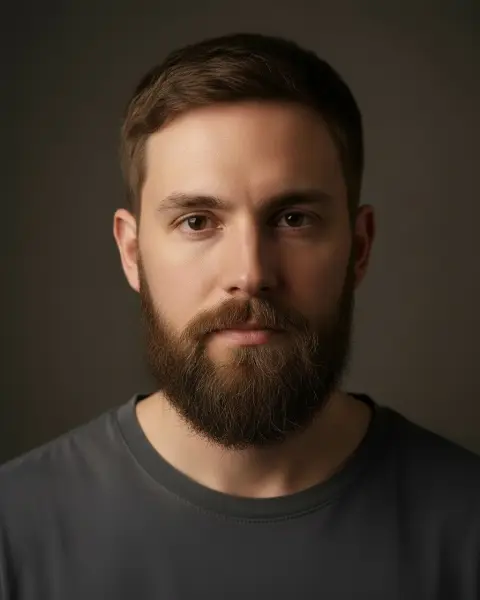
Full beard
About 3 cm, rounded at the chin. Adds width and weight to a narrow jaw.

Van Dyke
A pointed chin beard with a separate moustache: sharp and classic.

Faded beard
Fuller at the chin, fading to skin at the sideburns.
- Cover grey
- Blend grey
- Go silver
- Icy platinum
- Ash blonde
- Honey blonde
- Copper
- Burgundy
- Jet black
- Espresso brown
- Chestnut
- Pastel pink
Your face scan stays on your phone.
Face-shape analysis runs on your device. A photo is only uploaded when you ask to see a cut on yourself, and you can delete everything from the app at any time. No face ratings, ever.
Questions
Haircuts, face shapes and try-ons, answered.
How do I know which haircut suits my face shape?
Start with your face shape. A round face needs height on top and short sides, a long face needs width and a fringe, and a square face can wear almost anything short. Cutmaxx measures your shape from one selfie and lists the cuts that suit it, with the reason for each.
How does Cutmaxx find my face shape?
It finds landmarks on your face (forehead, cheekbones, jaw and chin) on your phone and compares their widths and your face length. You get one of seven shapes: oval, round, square, oblong, heart, diamond or triangle.
Can I try a haircut on my own photo?
Yes. Pick a cut and Cutmaxx shows it on your selfie with AI: same face, new hair. You can add a beard or a hair colour on top and compare before and after.
Is my selfie uploaded?
Not for the face scan: that runs on your phone. A photo is uploaded only when you ask for a try-on, and you can delete all your photos and your account in the app at any time.
Is Cutmaxx free?
Face shape and haircut recommendations are free. AI try-ons come in one-time packs that never expire, or with Cutmaxx Pro, a subscription for barbers and people who try lots of looks.
Does it rate my looks?
No. There are no attractiveness scores. Cutmaxx only deals with what you can change: your haircut, your beard and your hair colour.
Cutmaxx for iPhone and Android
See your next haircut before you get it.
Face shape and recommendations are free. Try-ons come in packs that never expire.